Stitch Patterns
Cross-stitch, bead, diamond painting and crochet charts
What it does
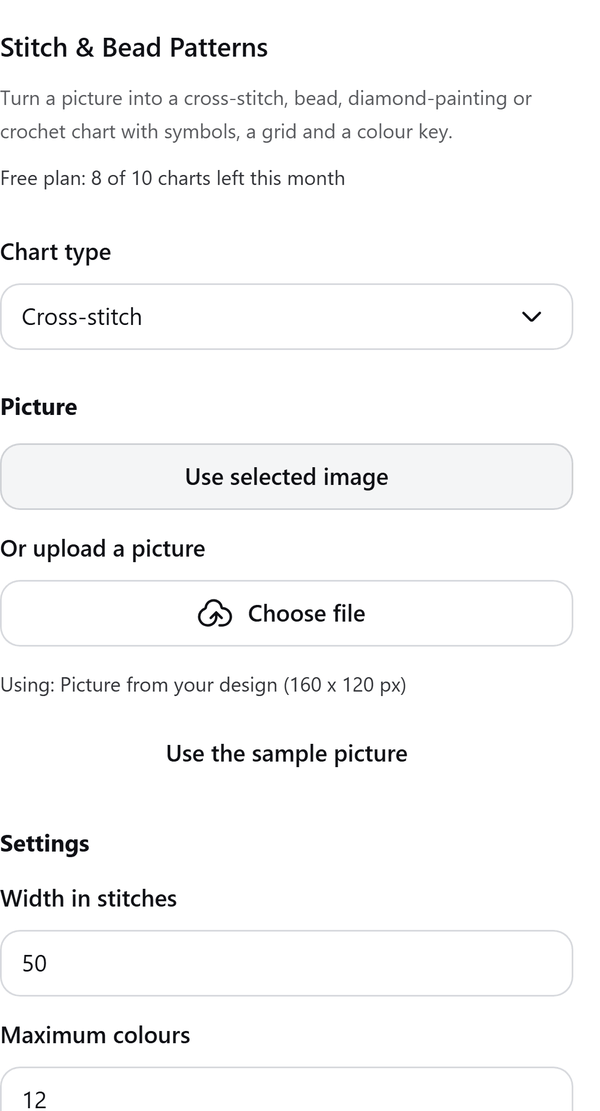
- Turns a picture (the selected image, an uploaded file or a sample) into a chart for cross-stitch, beads, diamond painting or crochet
- Sets the width in stitches, the maximum number of colours, the fabric count and optional dithering, with a live preview
- Writes a colour key with stitch counts and, for cross-stitch, skein estimates (they assume 2 strands, a 25% allowance and an 8 m skein, and say they are estimates)
- Uses approximate screen colours for DMC, Perler and Hama palettes; the panel says so and credits the colour data
- Adds the chart to the design as printable Letter pages; a run that stops part way can resume from the failed page
How to use it
- Select a picture in your design, or choose Choose file to upload one, then open Stitch & Bead Patterns from the Apps tab.
- Pick the Chart type, then press Use selected image or upload a picture.
- Set Width in stitches, Maximum colours and Fabric count. Check the Preview and the Colour key.
- Press Add preview page (Free) or Add pattern pages (Pro). Pages are added one at a time.
- If a run stops, press Resume to continue from the failed page.
Free and Pro
Plan limits reset each calendar month (UTC). Pro is billed through Polar.
| Free | Pro | |
|---|---|---|
| Charts a month | 10 | Unlimited |
| Chart size | Up to 60 x 60 | Up to 300 x 300 |
| Colours | Up to 12 | Up to 60 |
| Output | One preview page | Chart pages, colour key pages, cover page |
| Symbols-only and both versions | No | Yes |
| Backstitch outline | No | Yes |
| Price | $0 | $6 per month or $45 per year |
Manage your Pro licence
You get a licence key by email after you buy Pro. Paste it into the app and press Activate licence. To use the key on another Canva account, press Deactivate this licence first. To restore Pro after a reinstall or on a new device, activate the same key again. To cancel, use the link in your Polar receipt email. Full steps: buying, restoring and managing Pro.
FAQ
Are the thread colours exact?
No. DMC, Perler and Hama values are approximate screen colours and the panel says so. Check them against your own stock. DMC, Perler and Hama are trademarks of their owners.
Does the Free plan include a printable chart?
Free adds one preview page with the whole chart, grid, numbers and a compact colour key. Pro splits larger charts across pages and adds key pages.
Will the same picture give the same chart?
Yes. With the same picture and settings the chart is the same every time.
What counts towards the monthly limit?
One chart written. The unit is given back if nothing at all could be written; a run that fails part way keeps it, and Resume does not spend another.
How do I get help?
Email contact@tidybutton.com with the app name and a short description of what happened. Do not send your full licence key.
What data does this app keep?
See the Privacy Policy. In short: designs and images stay in your browser; our server keeps your Canva user and brand ids, monthly usage counts and your licence status.
Contact
contact@tidybutton.com