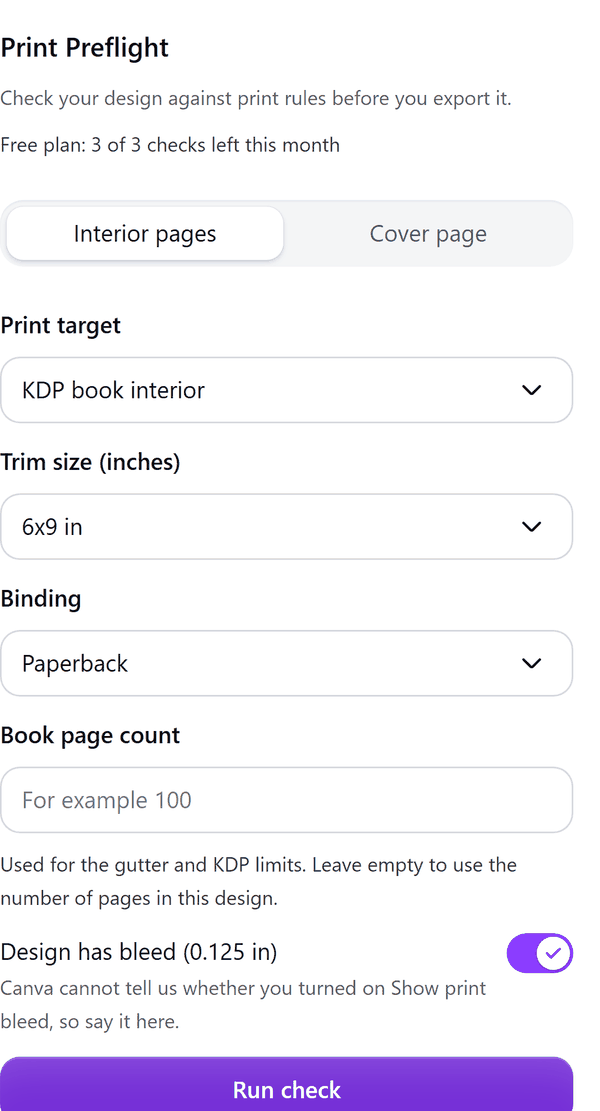
Print Preflight
Find print problems before you export
What it does
- Checks page size, safe margin, bleed, image resolution (dots per inch), text size and, for books, the page count
- Offers two tabs: Interior pages and Cover page (the cover check is Pro)
- Takes a print target, a trim size, the binding, an optional book page count, and whether the design has bleed (Canva does not tell apps whether bleed is turned on, so you say it)
- Lists problems page by page, marked as error or warning
- Pro: fixes what it can, adds magenta safe margin guides to the design, and adds the report as a page
How to use it
- Open your design and open Print Preflight from the Apps tab.
- Pick the Print target, the Trim size and the Binding. Enter the Book page count if you know it, or leave it empty to use the number of pages in the design.
- Turn on Design has bleed if you turned on Show print bleed in Canva.
- Press Run check and read the report. Page numbers are shown because apps cannot jump to a page.
- Pro: press Fix issues to correct what can be fixed, Add safe margin guides to draw guides (delete them before export), or Export report as page.
Free and Pro
Plan limits reset each calendar month (UTC). Pro is billed through Polar.
| Free | Pro | |
|---|---|---|
| Checks a month | 3 | Unlimited |
| Report by page | Yes | Yes |
| One-click fixes | No | Yes |
| Safe margin guides | No | Yes |
| Report exported as a page | No | Yes |
| Cover page check | No | Yes |
| Price | $0 | $7 per month or $49 per year |
Manage your Pro licence
You get a licence key by email after you buy Pro. Paste it into the app and press Activate licence. To use the key on another Canva account, press Deactivate this licence first. To restore Pro after a reinstall or on a new device, activate the same key again. To cancel, use the link in your Polar receipt email. Full steps: buying, restoring and managing Pro.
FAQ
Does it check colour (CMYK)?
No. Canva apps cannot read colour mode. For print, export as PDF Print and choose CMYK (a Canva Pro feature).
Why is something listed as not checked?
Groups, embeds, unsupported content and rotated elements are not measured for margin or bleed, so they are listed as not checked instead of being marked as errors.
Do the guides print?
Guides are real magenta rectangles with a label. Delete them before you export.
Are the rules exact?
Page sizes, margins and bleed follow the published rules of the print target. The hardcover page range and some size lists are approximate, and the app says so.
How do I get help?
Email contact@tidybutton.com with the app name and a short description of what happened. Do not send your full licence key.
What data does this app keep?
See the Privacy Policy. In short: designs and images stay in your browser; our server keeps your Canva user and brand ids, monthly usage counts and your licence status.
Contact
contact@tidybutton.com