Planner & Calendar
Dated planner and calendar pages from one template
What it does
- Reads one template page and finds placeholders such as {{date}}, {{weekday}}, {{day}}, {{month}}, {{year}}, {{week_no}}, {{d1}} to {{d7}}, {{w1}} to {{w7}}, {{grid}} and {{c1}} to {{c42}}
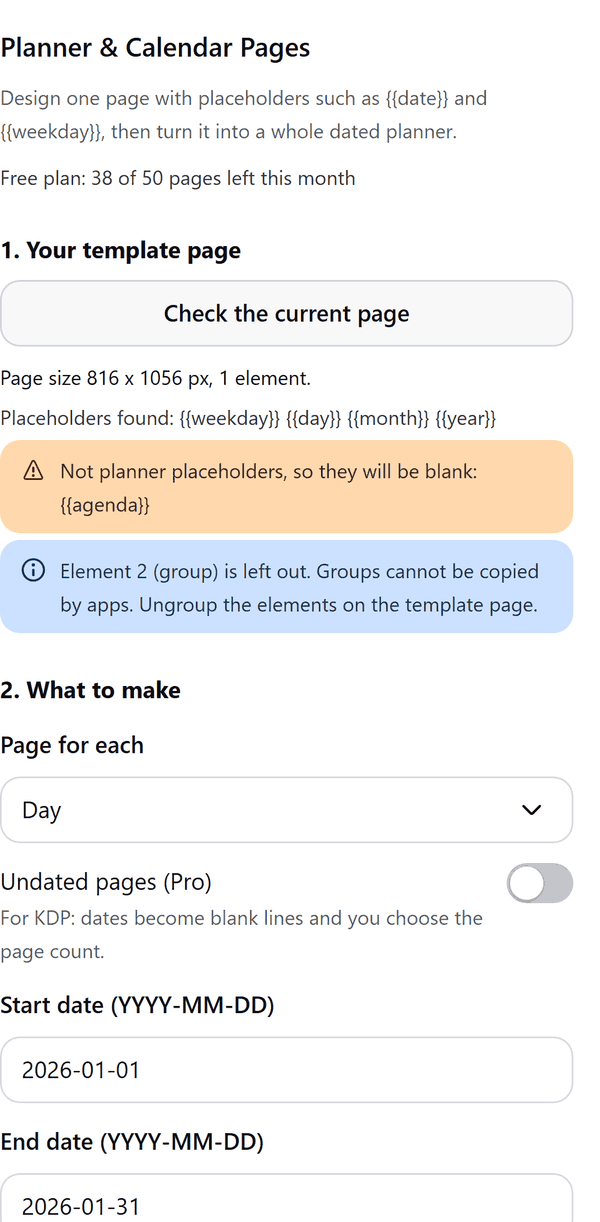
- Lists unknown placeholders and notes elements it cannot copy (such as groups)
- Adds one page per day, week or month for the dates you choose, in your language and with Monday or Sunday week start
- Pro: holiday names, undated pages for books, a cover page, a year at a glance page and an index page with page numbers (plain text, not links)
- Stops cleanly if Canva's page limit for a design is reached, and offers to continue from that page in a new design (the resume point is kept in this browser)
How to use it
- Design one page and type placeholders where dates go, for example {{weekday}} and {{day}}, or {{grid}} for a month grid.
- Open Planner & Calendar Pages from the Apps tab and press Check the current page. It lists the placeholders it found and anything it cannot copy.
- Under What to make, choose Page for each, the Start date and End date (YYYY-MM-DD), the week start and the language.
- Press Create pages. The panel shows progress and then the number of pages added.
- Scroll the page strip to check the pages. Delete the template page if you do not need it.
Free and Pro
Plan limits reset each calendar month (UTC). Pro is billed through Polar.
| Free | Pro | |
|---|---|---|
| Pages a month | 62 | Unlimited |
| Date range | One calendar month | Any range |
| Page for each | Day or month | Day, week, month, year at a glance |
| Holidays | No | Yes |
| Undated pages | No | Yes |
| Cover and index pages | No | Yes |
| Print size presets | No | Yes |
| Price | $0 | $6 per month or $39 per year |
Manage your Pro licence
You get a licence key by email after you buy Pro. Paste it into the app and press Activate licence. To use the key on another Canva account, press Deactivate this licence first. To restore Pro after a reinstall or on a new device, activate the same key again. To cancel, use the link in your Polar receipt email. Full steps: buying, restoring and managing Pro.
FAQ
How many pages can one run make?
Up to 1,100 pages. Canva also limits how many pages a design can hold; if that limit is reached the run stops and the panel offers Continue from page N in a new design.
Why are some placeholders blank?
Placeholders the app does not know come out blank and are listed in the panel. A text box whose placeholder has no value (an unused calendar cell, a day with no holiday) is left out.
Which holidays are included?
US, UK, India, Canada and Australia, with English names. Weekend substitutions and lunar or regional holidays are not included.
Can the index page link to pages?
No. Canva apps cannot create links to pages, so the index lists months with page numbers as plain text.
How do I get help?
Email contact@tidybutton.com with the app name and a short description of what happened. Do not send your full licence key.
What data does this app keep?
See the Privacy Policy. In short: designs and images stay in your browser; our server keeps your Canva user and brand ids, monthly usage counts and your licence status.
Contact
contact@tidybutton.com