Logbook Pages
Ruled logbook, habit tracker and reading log pages
What it does
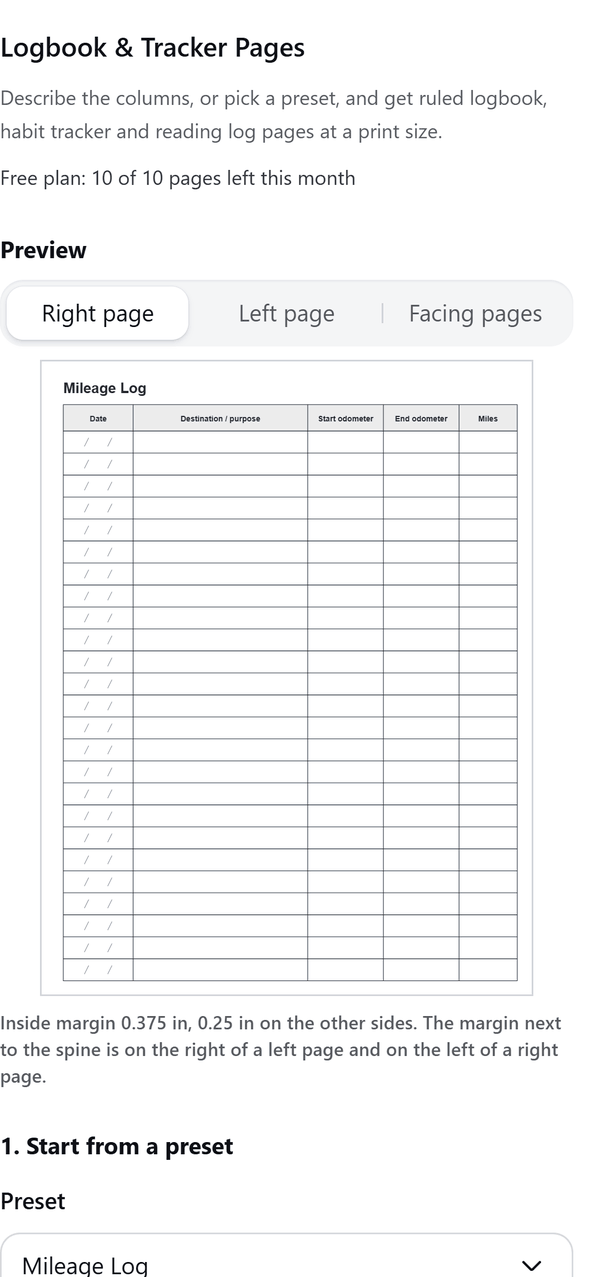
- Starts from a preset such as Mileage Log, Reading Log or Habit Tracker, or from your own columns
- Gives each column a name, a width share and a type: text, checkbox, date or rating
- Lets you set the rows per page, the number of pages, the line weight and the page size
- Shows a preview of a right page, a left page or both side by side, with the inside margin for the spine on the correct side
- Adds the pages to your design and stops cleanly if the design is full, so you can continue from that page in a new design
- Pro: header and footer text, page numbers, a cover page with a title and subtitle, and a how-to-use page
How to use it
- Open a design and open Logbook & Tracker Pages from the Apps tab.
- Under 1. Start from a preset choose a preset, or change the columns under 2. Columns.
- Under 3. Page set the Rows per page, Pages, Line weight and Page size. Check the Preview and choose Facing pages to see both sides.
- Press Create pages. The panel shows how many pages were added.
- Look at pages 1 and 2 side by side to check the inside margins before you print.
Free and Pro
Plan limits reset each calendar month (UTC). Pro is billed through Polar.
| Free | Pro | |
|---|---|---|
| Pages a month | 10 | Unlimited (up to 300 in one run) |
| Presets | 5 | 49 |
| Page size | US Letter (8.5 x 11 in) | 8 trim sizes plus A4 and A5 |
| Bleed | No | Yes |
| Your own columns | Up to 6 | Up to 12 |
| Header and footer text, page numbers | No | Yes |
| Cover page and how-to-use page | No | Yes |
| Price | $0 | $5 per month or $35 per year |
Manage your Pro licence
You get a licence key by email after you buy Pro. Paste it into the app and press Activate licence. To use the key on another Canva account, press Deactivate this licence first. To restore Pro after a reinstall or on a new device, activate the same key again. To cancel, use the link in your Polar receipt email. Full steps: buying, restoring and managing Pro.
FAQ
Do the pages work for printing as a book?
Yes. Choose a trim size (Pro) and, if your printer needs it, bleed. The margin next to the spine is on the right of a left page and on the left of a right page.
What counts towards the monthly limit?
Each page created, including a cover page or how-to-use page if you add one.
Can I make my own columns?
Yes. Add up to 6 columns on Free or up to 12 on Pro. Each column has a name, a width and a type.
A run stopped before the end. What now?
Canva limits how many pages a design can hold. Open a new design and choose Continue from the page the panel shows.
How do I get help?
Email contact@tidybutton.com with the app name and a short description of what happened. Do not send your full licence key.
What data does this app keep?
See the Privacy Policy. In short: designs and images stay in your browser; our server keeps your Canva user and brand ids, monthly usage counts and your licence status.
Contact
contact@tidybutton.com