Book Interior
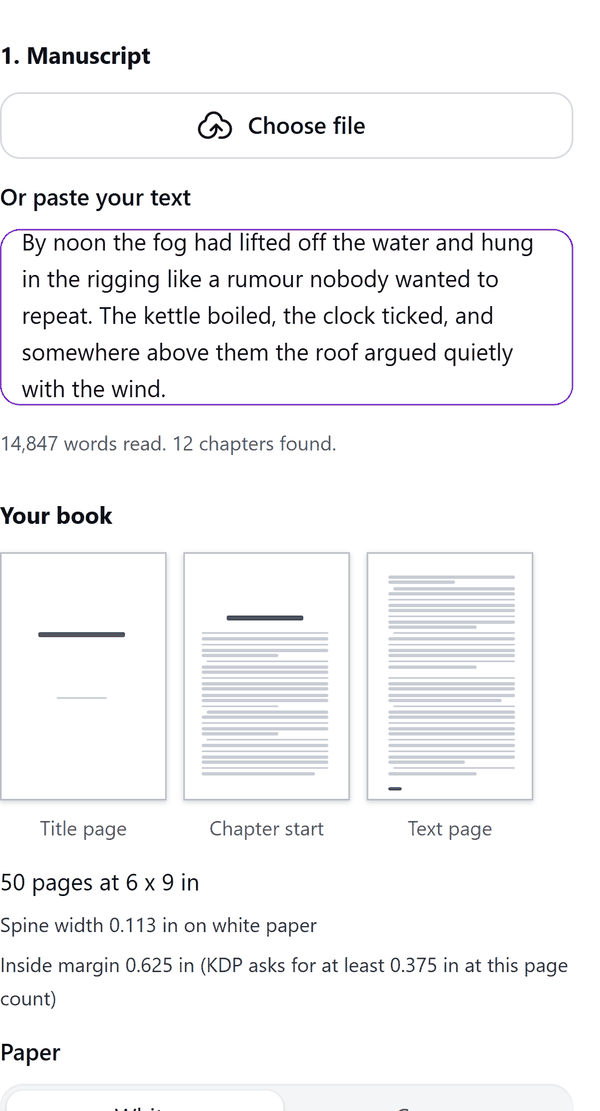
A manuscript set as book pages at print size
What it does
- Reads your manuscript from a file (Word .docx, .txt or .md, up to 12 MB) or from pasted text
- Starts a chapter at a # line or a line such as Chapter 1; a line of *** is a scene break
- Lets you choose the trim size, paper (white or cream), font, text size, line spacing, outside margin and whether chapters start on a right-hand page
- Sets the inside margin from the page count and tells you when it is below what KDP asks for at that count
- Shows thumbnails of a title page, a chapter start and a text page, with the page count and the spine width
- Adds the pages to your design; if the design is full the run stops and you can continue in a new design
- Pro: a contents page, running heads (book title on the left, chapter on the right), drop caps, scene-break ornaments (stars, dots or dashes) and bleed
How to use it
- Open a design and open Book Interior Formatter from the Apps tab.
- Under 1. Manuscript press Choose file, or paste your text, or press Try a sample manuscript.
- Under 2. Book enter the title and author, then choose the Trim size, Fonts, Text size, Line spacing, Outside margin and Paper.
- Look at the thumbnails and the page count. Fill in 4. Copyright page if you want one.
- Press Add pages to design. Check one chapter start and one text page in the editor, because fonts can wrap slightly differently.
Free and Pro
Plan limits reset each calendar month (UTC). Pro is billed through Polar.
| Free | Pro | |
|---|---|---|
| Runs a month | 3 | Unlimited |
| Pages in one run | First 24 | The whole book |
| Trim size | 6 x 9 in | 5 x 8, 5.25 x 8, 5.5 x 8.5, 6 x 9, 7 x 10, 8 x 10, 8.25 x 11 and 8.5 x 11 in |
| Bleed | No | Yes |
| Contents page | No | Yes |
| Running heads | No | Yes |
| Drop caps and scene-break ornaments | No | Yes |
| Price | $0 | $7 per month or $49 per year |
Manage your Pro licence
You get a licence key by email after you buy Pro. Paste it into the app and press Activate licence. To use the key on another Canva account, press Deactivate this licence first. To restore Pro after a reinstall or on a new device, activate the same key again. To cancel, use the link in your Polar receipt email. Full steps: buying, restoring and managing Pro.
FAQ
Does my manuscript leave my computer?
No. Your text is read and set in your browser. Our server only counts your monthly runs.
What does the Free plan add?
The first 24 pages of the book in each run, at 6 x 9 in, up to 3 runs a month. Pro adds the whole book.
Can I get the spine width for my cover?
Yes. The panel shows the spine width for your page count and paper, and a button copies a note you can paste into Book Cover Builder.
Why do some pages look different in Canva?
Canva can wrap text slightly differently from the preview. Check one chapter start and one text page after the pages are added.
Are there limits on book length?
A run takes up to 3 million characters. The panel warns when the book is under 24 pages or over 828 pages, which are the limits KDP prints.
How do I get help?
Email contact@tidybutton.com with the app name and a short description of what happened. Do not send your full licence key.
What data does this app keep?
See the Privacy Policy. In short: designs and images stay in your browser; our server keeps your Canva user and brand ids, monthly usage counts and your licence status.
Contact
contact@tidybutton.com